A single-box homelab on Proxmox VE 9
Design notes behind 48 isolated containers, split DNS, and per-service VPN routing on one machine the family never has to think about
Overview
The whole homelab runs on one desktop-class box under the stairs: Proxmox VE 9, an OPNsense VM as the network edge, and one unprivileged LXC container per service. It exists for my family first: photos, documents, passwords, media, all of it on this one box, and nobody else in the house ever has to think about it.
The usage numbers still surprise me, though. The most-used service is not the media stack; it is Vaultwarden, the family password manager. My wife approved of it, and it saw the biggest uptake of anything I have ever deployed: the household’s logins now live in a vault on our own hardware, backed up with everything else. That one service did more for the family’s digital life than every other service on the box combined.
The design goal was never “datacenter at home”; it was “one machine I can rebuild from notes, where every service is isolated, disposable and backed up”.
Two conventions carry most of the design:
- One box, one service. Each app gets its own container with its own IP, config mount and backup. An upgrade of one service can never break its neighbour.
- Everything is a mount point. Container root disks stay tiny and disposable on the NVMe pool; the actual data lives in host directories bind-mounted into the guest, so a container can be destroyed and recreated in minutes with zero data loss.
Hardware
| Part | Choice |
|---|---|
| Board | Gigabyte B760M Gaming Plus WiFi (DDR4) |
| CPU | Intel i5-13400, 10 cores / 16 threads |
| RAM | 64 GB DDR4-2667 |
| Boot / VM disk | 2 x 960 GB Micron 7450 NVMe (ZFS mirror) |
| Bulk disk | 14 TB Seagate Exos (ZFS, single disk) |
| NICs | Intel I226-V 2.5 GbE PCIe card (LAN), Realtek RTL8111 1 GbE (WAN) |
| iGPU | Intel UHD Graphics 730 |
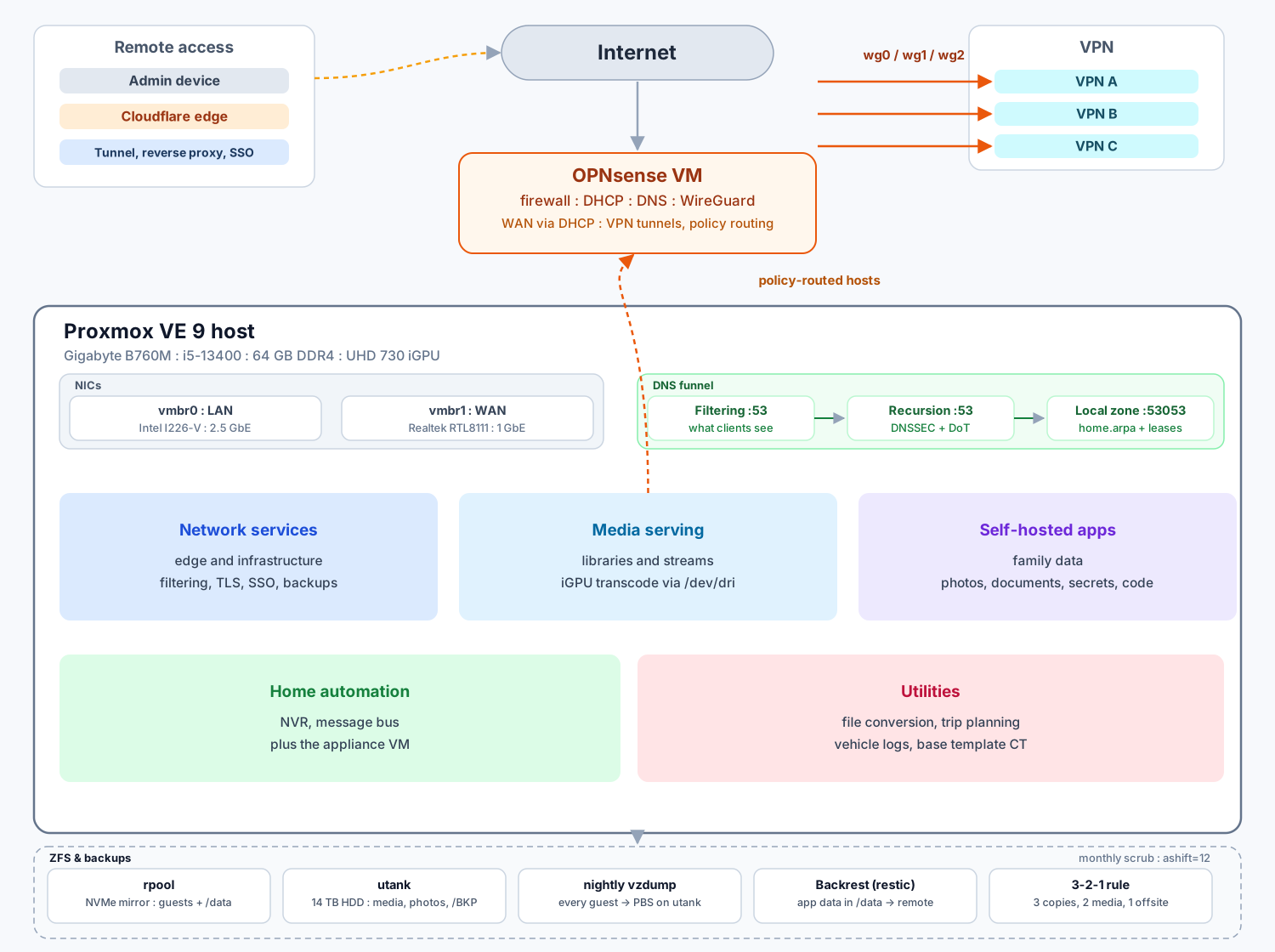
The 13400 with its UHD 730 handles Jellyfin transcoding and Scrypted camera streams through /dev/dri passthrough; no discrete GPU needed. The two NICs split the network roles: the Intel I226-V PCIe card bridges to the LAN at 2.5 GbE, the Realtek port bridges to WAN. How the box went together, part by part with photos: Assembling the homelab box.
Storage
Two ZFS pools, both created with ashift=12:
zpool create -o ashift=12 rpool mirror nvme0n1p3 nvme1n1p3
zpool create -o ashift=12 utank /dev/sda1rpool(mirror, ~890 GB) holds the OS, every guest root disk, and anappdatadataset mounted at/data. Guest disks are cheap here; they are small and snapshotted.utank(~12.7 TB, single disk) holds the bulk: the media library underHTPC/, the photo library underLIBRARY/, and backups underBKP/. The disk itself is a shucked Seagate Expansion Desktop; what turned out to be inside is its own post: Shucking the Seagate Expansion Desktop 14TB.
Scrubs run monthly. Both pools came back clean last scrub, 0 errors.
One service, one container
All 48 containers are unprivileged LXC guests provisioned from community-scripts ↗. VMIDs are allocated in ranges by purpose, and the ranges double as an address plan (more on that below):
| VMID range | Purpose | Examples |
|---|---|---|
| 10xx | Network infrastructure | AdGuard Home, Caddy, PBS |
| 2001 | Base template | Debian + zsh + pyenv, cloned for new guests |
| 40xx | Media serving | Jellyfin, Audiobookshelf, Komga |
| 50xx | Self-hosted apps | Vaultwarden, Immich, Paperless-ngx, Gitea |
| 60xx | Miscellaneous | Lubelogger, travel planning, file conversion |
| 8xxx | Home automation | Scrypted NVR, go2rtc, plus the HAOS and OPNsense VMs |
The address plan falls out of the VMID scheme. The LAN is a private /23 split in two ranges: one for core network devices, one for service guests, and each service guest’s last octet comes from its VMID. The Proxmox tags field carries that octet so the mapping stays visible in the web UI. All guests get their addresses from DHCP; the reservations live in OPNsense’s dnsmasq with a description per host.
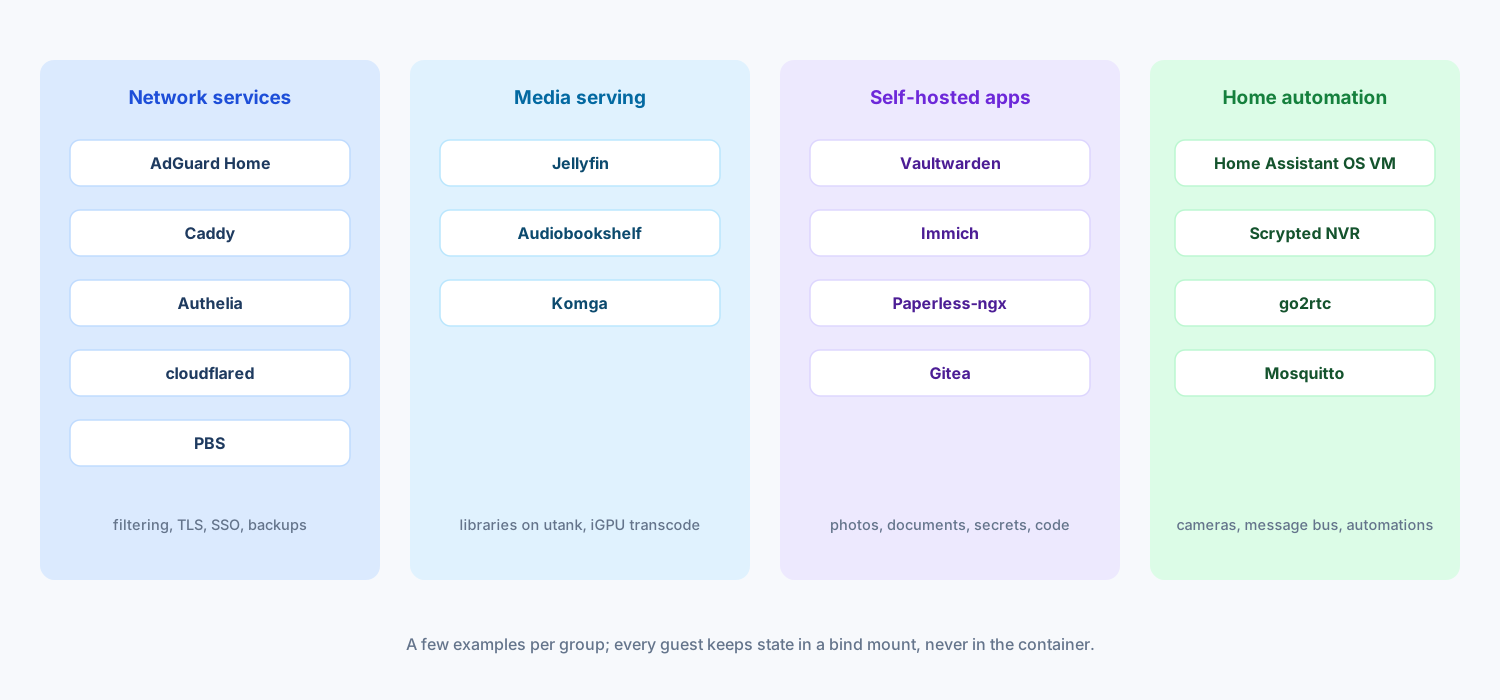 One container per service. Each group shows only a few examples; the pattern holds for all 48.
Every service container follows the same shape:
- a small root disk (1 to 20 GB) on
rpool/data - its persistent state bind-mounted from
/data/lxc/<service>/ - read-only media mounts from
utankwhere it needs them
Because the state is outside the container, rebuilding a guest is: clone the template, re-add the mount, done. That low cost is what makes the one-service rule livable; rebuilding in minutes means I actually dare to touch these guests. Guests that need hardware get it explicitly: the media and camera guests have /dev/dri bound in for the iGPU, Scrypted also gets /dev/kfd for compute, and nothing else sees the host devices.
The edge: OPNsense in a VM
The router runs as a VM in the 8xxx range above, started first on boot (order 1, 30 s boot delay), with 24 GB of RAM and two virtio NICs:
net0onvmbr0, the LAN bridge (2.5 GbE port), a static address in the core rangenet1onvmbr1, the WAN bridge (1 GbE port), DHCP from the ISP
Running the firewall as a guest keeps it in the same backup and snapshot pipeline as everything else. The tradeoff is obvious and accepted: no host, no network, so the Proxmox host itself is managed from the LAN side only.
DNS and DHCP
The resolver chain is split across three components on purpose:
clients
  -> AdGuard Home        :53   filtering, per-client stats, home.arpa rewrites
  -> Unbound (OPNsense)  :53   DNSSEC, recursion, DoT upstream to 1.1.1.1
-> dnsmasq (OPNsense) :53053 authoritative for home.arpa, DHCP lease namesAdGuard Home is the only resolver clients see; its sole upstream is Unbound on the OPNsense LAN IP, so nothing on the LAN can bypass filtering by pointing elsewhere. Unbound does the recursive work with DNSSEC on, encrypts upstream queries with DoT (verified against cloudflare-dns.com), and forwards home.arpa lookups to dnsmasq on 127.0.0.1:53053, which knows every DHCP lease and static entry. About a hundred hosts have static entries with descriptions; pve.home.arpa, hass.home.arpa, scrypted.home.arpa and friends resolve without touching public DNS.
DHCP uses tags to hand different resolvers to different hosts. A tag groups one DHCP option with one range; a static host entry then opts a client into it:
- default range: option 6 = AdGuard Home (filtering for everyone)
- a tag per tunnel: option 6 = that tunnel provider’s DNS, so a host routed through a tunnel also resolves through it
The DNS tag matters because of the next section: a host policy-routed through a VPN must resolve through that VPN’s DNS too, or queries leak out the wrong path.
Selective routing over WireGuard
Three always-on WireGuard tunnels terminate on OPNsense as additional WAN interfaces, each to a commercial VPN provider, each with its own peer, keepalive of 25 s, and routes disabled so nothing uses them by default. Each exists so a defined group of hosts can pin its egress to a single provider.
Policy routing is one repeated pattern. A firewall alias lists the hosts, a LAN rule sends them to the tunnel gateway unless the destination is local, and a hybrid outbound NAT rule masquerades them on that interface:
action: Pass, quick
interface: LAN, direction: in
source: <tunnel host alias>
destination: !( RFC1918 networks )
gateway: <tunnel gateway>Result: LAN traffic between guests never hairpins through a VPN, everything those aliases talk to the internet for exits through the assigned tunnel, and the DHCP DNS tags from the previous section keep name resolution on the same path. The peer configs are regenerable from each provider’s API with a small script, so rotating servers is a re-run of the script, not a rewire.
Remote access
No inbound ports are forwarded. Remote access runs through a Cloudflare Tunnel from the cloudflared container to a reverse proxy chain: Caddy terminates TLS per service, Authelia sits in front for SSO and two-factor auth, and the tunnel carries SSH to the Proxmox host the same way. Services are published as service.home.arpa internally and a personal domain externally, both names pointing at the same Caddy.
Media, photos and documents
Media serving is where guests lean on the iGPU: Jellyfin transcodes through /dev/dri, with its library mounted read-only from utank. Photos run on Immich with the library on utank, documents on Paperless-ngx, comics on Komga, audiobooks and podcasts on Audiobookshelf.
Home automation and cameras
- Home Assistant runs as a HAOS VM (the one case where an appliance image beats a container), with Mosquitto and the Matter server as add-ons.
- Scrypted runs in an LXC with
/dev/dribound in for camera transcoding, mounted volumes onrpool, plus optional device mounts (/dev/kfd, Coral-styleapex) wired up for hardware I have not added yet.
Backups
Two layered jobs, all snapshot mode where possible:
- Nightly: vzdump of every guest except PBS itself, into the PBS container’s datastore on
utank, which also moves the guest state off the SSD pool onto the bulk HDD. - Nightly: the PBS container backs itself up (
keep-last 10) to a plain directory dataset, so the backup server is itself backed up.
Inside the guests, Backrest (restic) covers the app data in /data separately from the whole-guest vzdumps, which makes single-file restores cheap, and pushes it to a remote repository, which is the offsite leg of the story.
Closing
What I would keep: the VMID-to-IP convention, config-outside-the-container mounts, and running the firewall as a guest. What is still open: zpool upgrade for both pools (feature flags are pending since the Proxmox 9 upgrade) and a Coral TPU for Scrypted. The whole stack fits in one desktop box that idles quiet enough to live under the stairs, which was the actual requirement.