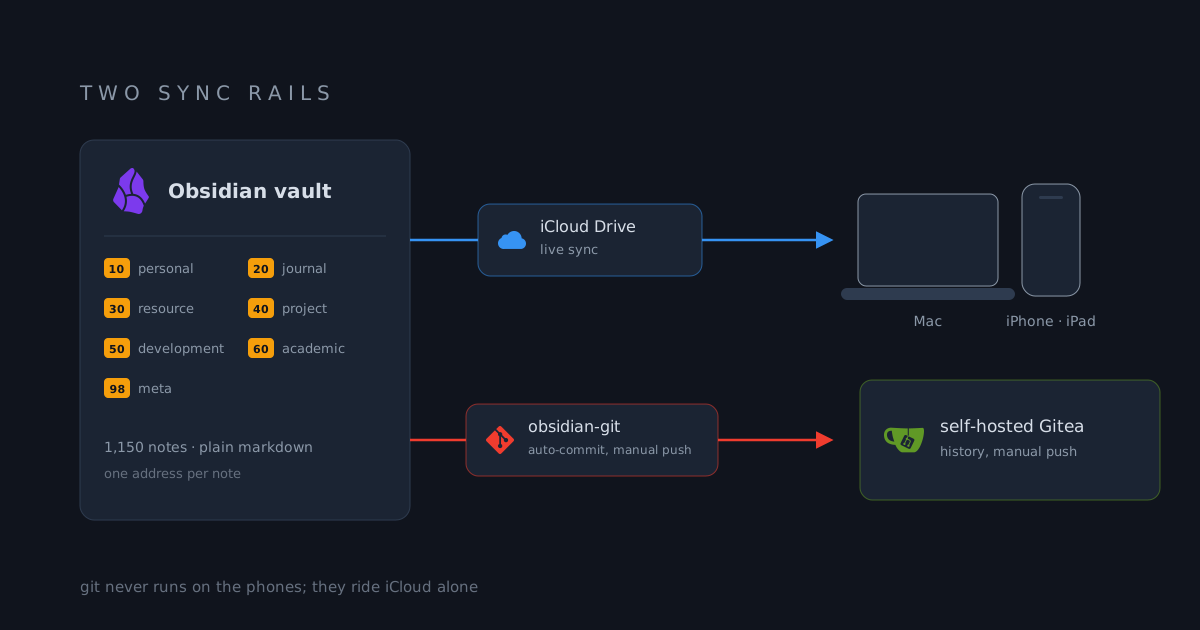
An Obsidian vault on numbered shelves, synced by iCloud and git
About a thousand notes across two-digit domains, minimal frontmatter on every file, and two rails that fail differently enough to cover each other
Overview
The vault holds about 1,150 notes and has outlived several systems that promised to organize them better. This post documents the current shape: how notes are classified, what metadata every note carries, and the two sync rails, iCloud and git, that move it between machines. Deliberately no note contents here; the structure is the interesting part.
The vault folder name carries a date, which is a habit worth keeping: each era of life gets a fresh vault, old ones stay frozen and readable, and the current one never drags a decade of clutter behind it.
How I got here
OneNote came first, through a bachelor’s degree where the equation editor was the feature that mattered. I was the only one in the lectures typing math instead of writing it down, and my hands still know those keystrokes. What pushed me out was the format: notes locked in a proprietary container that grep could not read and git could not track.
The zettelkasten years followed, a run of plain-text editors with Zettlr
as the longest stop. The YYMMDD- prefix on notes here is a zettelkasten
convention, and it never left. No single editor survived those years:
each had its own ideas about where notes live and how they connect, so
every switch meant another migration.
Then LaTeX and vim, notes written as .tex and edited like code. Total
control, and capture slowed to the speed of the toolchain, which is the
wrong direction for notes. None of it was built for a phone.
Obsidian is where this settled. The notes are plain markdown on disk, so iCloud and git work on the folder directly and the mobile app reads exactly what the desktop writes, with no export step anywhere. Migration ended when the app became replaceable, which is why this post is about folders and rails rather than features.
Numbered shelves
Classification is a two-level numbering scheme in the Johnny Decimal spirit. Top-level domains are two-digit, and every shelf inside them takes the parent’s number:
10 Personal      the life admin shelf
20 Journal       daily and period writing
30 Resource      collected knowledge about tools and techniques
40 Project       one shelf per active project
50 Development   long-lived technical topics
60 Academic      courses and research
98 Meta the vault's own machineryThe rule that makes numbering worth it is boring: a note has exactly one address, search scope shrinks to a shelf, and restructuring means moving one numbered folder instead of re-sorting a thousand files. When a project dies, its shelf dies with it. Domains get added above 90 only for the vault’s own machinery, so the content numbering stays stable.
Note identity and metadata
Every note starts from a template and carries the same minimal frontmatter: a creation date, a modification date, and a tag. Templates fill the dates automatically and prompt once for the tag, because a tag asked for at creation is the one that actually gets chosen.
Tags follow a family/scope pattern, hierarchical where it helps: journal
notes are tagged by family and week, class notes by family and course, so a
semester or a week is one tag click away. Notes also carry an ID prefix
(YYMMDD-), which keeps note filenames sortable and unique without thinking
about it.
The template gallery is small on purpose: daily notes, meeting minutes, class notes, a people note, and capture templates for scans and OCR. Daily notes are the hub; each one opens with links to yesterday and tomorrow and an Eisenhower matrix built from task queries, so the day starts with a filtered view of what is urgent and what matters.
Sync rail 1: iCloud
The vault lives in iCloud Drive, which means the macOS and iOS Obsidian apps see the same folder natively. This rail is instant, silent, and needs no configuration; a note written on the phone is on the laptop by the time I sit down. Its failure mode is a conflicted copy appearing next to the original, which is rare and always visible in the file list.
Sync rail 2: git
The second rail is the obsidian-git plugin, and it is configured to do one job continuously and another only on command:
- Auto-commit every five minutes with a
vault backup: <date>message, changed files listed in the message body. - Rebase as the sync method, so local history stays linear.
- Push stays manual, to the self-hosted Gitea.
That split is deliberate. Commits are cheap and frequent, capturing a timeline that no file-level sync can offer; deleting a paragraph yesterday is recoverable today. Pushing is a decision, because publishing the vault offsite should never ride an automation. Git never runs on the phones at all; it protects the vault’s history, not its availability.
Cross-device config: .obsidian and .obsidian.ios
The vault carries two config folders. The desktop one holds the automation
stack: obsidian-git, Templater, QuickAdd, and the auto-link-title plugin.
The iOS one, kept alongside as .obsidian.ios and renamed into place on
the phone and iPad, holds a different set: relative line numbers, an
alternative file tree, the table editor, admonition callouts, a code-block
syntax highlighter, and meld-encrypt for the few notes that are encrypted
at rest.
The split exists because the platforms are different tools. Git cannot run inside iOS Obsidian, and the templating automations that make sense at a keyboard are noise on a phone, where capture speed is the only feature that matters. Shared machinery stays in the vault itself, in the meta shelf: templates, the one script, and notes documenting the Shortcuts and widgets that push content into the vault from the home screen.
Closing
iCloud gives the vault its speed: every device sees what feels like a local file. Git gives it history: every past state of every note stays recoverable. The two fail in different ways, so together they cover each other’s gaps. Underneath, the numbered shelves and the minimal frontmatter keep a thousand notes boring, which is exactly what I want from a note system.