A self-hosted app store for SideStore and F-Droid
One Caddy endpoint and static JSON catalogs put sideloaded apps on every device in the house, with signing that never leaves the rack
Overview
Every device in the family runs at least a few apps that never came from the official stores. My wife and I live on iPhones and iPads; one of my siblings is on Android, and I want both platforms covered, including the apps I develop myself. The reasons are ordinary: my wife plays a game that is only published in the Vietnamese App Store, a few apps stopped shipping versions for the older iPhone models still in the house, and there is a running list of open source apps I want to try. On the Apple side that means sideloading IPAs with a developer certificate; on the Android side it means APKs that Google Play will never list. Managing that by cable and by messaging random download links gets old fast, so I treated it as a distribution problem and built it like every other service in the rack: one endpoint, static files, boring infrastructure.
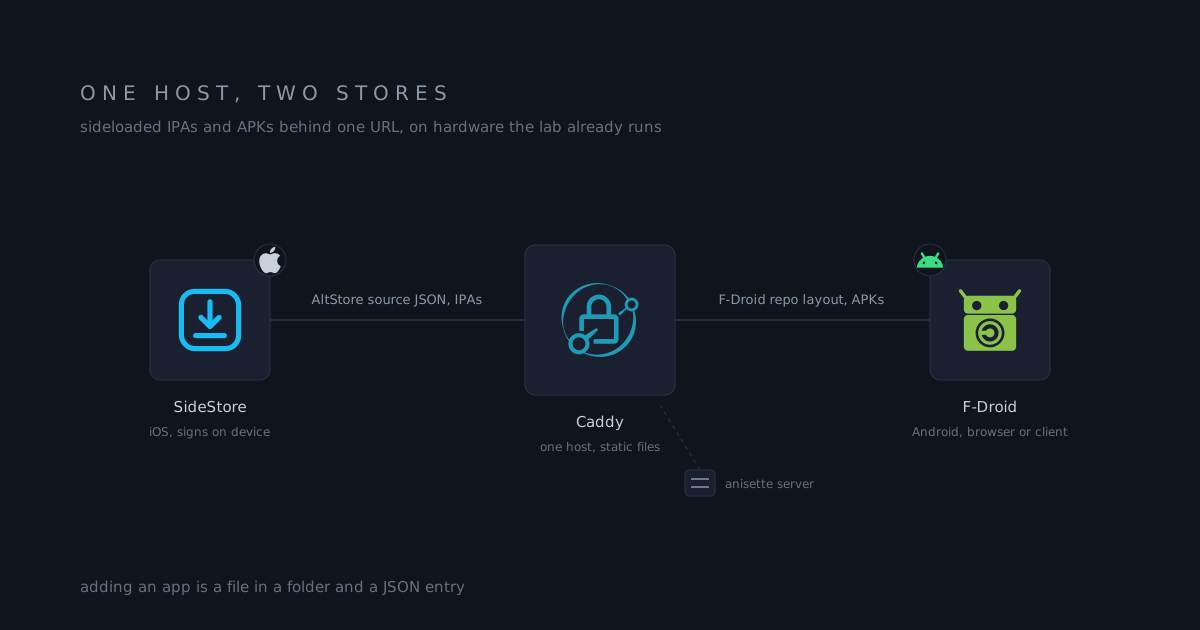
The result is a single host, store.<domain>, that fronts two ecosystems:
| Platform | Client | Catalog | Binaries |
|---|---|---|---|
| iOS / iPadOS | SideStore | AltStore source JSON | self-hosted IPAs |
| Android | F-Droid client or browser | F-Droid repo layout | self-hosted APKs |
This post covers the delivery mechanism only.
The catalog is just JSON
SideStore and AltStore read a plain JSON document over HTTPS. No server-side logic is required: the source is a file listing apps, and each app carries its own metadata, changelog, screenshots, and download URLs. The field names follow AltStore’s published source schema ↗, so anything that reads an AltStore source reads this one. The whole schema fits on one screen:
{
  "name": "IPA Library",
  "identifier": "com.example.altsource",
  "sourceURL": "https://store.<domain>/source.json",
  "featuredApps": ["com.vendor.app"],
  "apps": [
    {
      "name": "App name",
      "bundleIdentifier": "com.vendor.app",
      "developerName": "Vendor",
      "subtitle": "Short line",
      "localizedDescription": "What the app does",
      "iconURL": "https://.../icon.png",
      "tintColor": "1fd362",
      "screenshotURLs": ["https://.../shot1.png"],
      "version": "19.49.7",
      "versionDate": "2024-12-30",
      "versionDescription": "Changelog for this version",
      "size": 122046197,
      "downloadURL": "https://.../app.ipa",
      "versions": [
        {
          "version": "19.49.7",
          "date": "2024-12-30",
          "downloadURL": "https://.../app.ipa",
          "size": 122046197
        }
      ]
    }
  ]
}The versions array is what makes the source feel like a store rather than
a downloads page: the client shows release history and lets a device roll
back to an older IPA without touching the server.
I run two tiers:
- The family source, the one catalog every device in the house has added: the apps people actually install, with a featured row at the top for the day-one picks.
- The staging source, subscribed only by my own devices: development builds, A/B tests between two builds of the same app, and experiments that are not ready for anyone else. When a build settles, it graduates into the family source.
The local mirror on the NAS
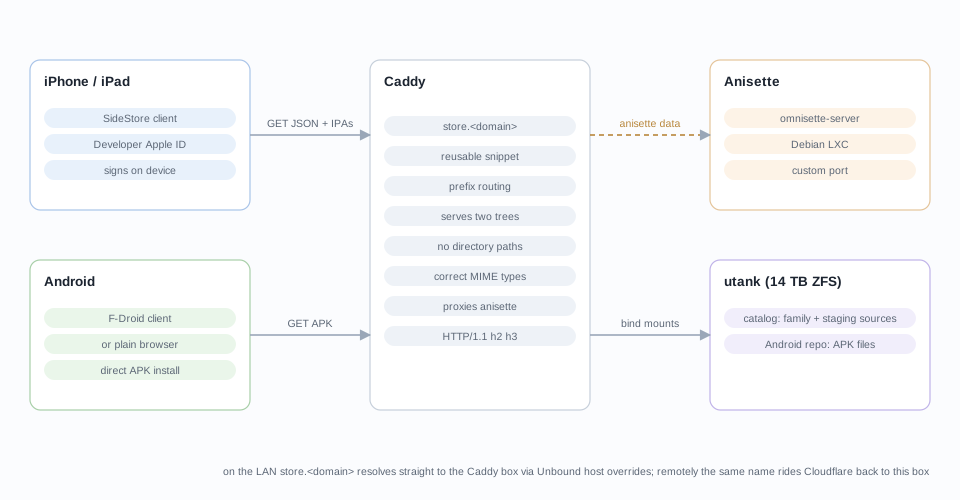
The catalogs live inside the LAN on utank, the 14 TB bulk pool:
/srv/appstore/
├── ipa/                 versioned build output from fastlane
├── apk/
├── catalog/             family + staging sources, local IPAs, screenshots
├── repo/                Android repo root
└── fastlane/ build reportsThe catalog folder holds both sources, each branded as its own catalog
with a different sourceURL, pointing downloadURL entries at local
copies of the binaries. This is where freshly built or resigned IPAs land
first, and it is the only way to distribute my own builds, which have no
reason to exist on a public file host at all. Those builds come out of a
long framework arc: my apps started in React Native, moved through Flutter,
and settled back in the native languages. The framework changed twice; the
output never did: an IPA or an APK that needs a home.
Caddy serves both ecosystems
The Caddy container gets two read-only bind mounts from utank, one per
tree. One host block on store.<domain> routes a path prefix to each root
through a reusable snippet. I am leaving the config out of this post:
a published host name plus its paths is all a scraper needs, and the catalog
is not looking for visitors.
Three details matter here:
- No directory listing. The snippet answers 403 for any bare directory path; only exact file URLs are served.
- No auth. Every other host name on this Caddy sits behind Authelia. This one deliberately does not, because phones need to fetch sources and IPAs without an interactive login, and the contents are meant to be freely readable by the people I gave the source URL to anyway.
- Correct content types. The
.apkfiles go out asapplication/vnd.android.package-archive, which matters because some Android browsers refuse installs from a wrong MIME type.
The host name resolves differently depending on where the client sits, which
is split-brain DNS doing its job: on the LAN, Unbound’s host overrides point
store.<domain> straight at the Caddy box, so a 200 MB IPA transfers over
gigabit Ethernet and never leaves the house. Remotely, the same name goes
through Cloudflare to the WAN 443 forward into the same Caddy. One URL works
everywhere; the route changes.
iOS: signing and the anisette server
SideStore handles the parts Apple makes hard. It is installed once, and after that it signs and installs IPAs on the device itself, no computer in the loop. The constraints are Apple’s, not SideStore’s:
- A free Apple ID signs apps for 7 days and caps three sideloaded apps.
- A paid developer account ($99 USD/year, roughly 130 CAD) signs for a full year and lifts the cap. I carry one: the free tier puts the whole store on a seven-day re-signing schedule, and I would rather pay it than run that loop for a family.
When SideStore talks to Apple’s signing endpoints it must present anisette
data, the per-device identifiers Apple uses to authenticate requests. I run
that piece myself instead of leaning on a public anisette endpoint: an
omnisette-server container, one of the smallest guests in the rack at
512 MB, running a single binary:
omnisette-server --http-port <port>Caddy proxies it over TLS at its own host name, and the anisette URL in SideStore settings points there. Every device in the family then signs against my endpoint: no dependence on someone else’s server staying up, and no third party in the signing path.
Android: an F-Droid repo is just a folder
F-Droid’s own client can be pointed at any repository, and a repository is nothing but static files on a web server: an index plus APKs. That makes the Android half of this setup almost trivially cheap, because the same Caddy that serves the SideStore source also serves the F-Droid repo from its own root.
The layout today holds the client APKs I want on Android devices, fetchable
by URL and installed directly, either from a browser or through an F-Droid
client. The next step when I get to it is generating a proper signed
index-v1.json with fdroidserver so the F-Droid client can manage updates
for those apps the way it manages everything else; the folder is already in
the layout that tooling expects, and Caddy does not care what the files are.
Why one endpoint matters
Both platforms end up behind one host name, one certificate, and one set of ACLs. Adding an app is dropping a file into a folder and adding a JSON entry; updating it is adding a version. Devices add the source once and everything after that is refresh and install from the store UI they already know.
The recurring cost is the developer account, and that would exist for any sideloading setup. Everything else rides on hardware and services the lab already runs, which is exactly how the rest of this homelab is built.