Alfred, the Powerpack, and a workflow for everything
cmd+space stops being plain Spotlight and starts converting, translating, and expanding text, with nineteen community add-ons riding Dropbox to every Mac
Overview
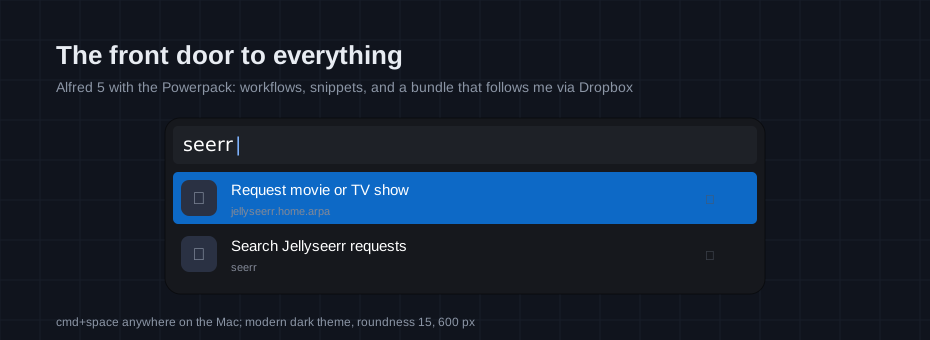
cmd+space on my Macs opens Alfred, not Spotlight. That swap is small, but it is the entry point to the rest of this post: Alfred with the Powerpack ↗ license, nineteen community workflows, text expansion snippets, and the entire settings bundle synced through Dropbox.
This is the third leg of the keyboard-first setup documented here. The Karabiner and yabai post covers keys and windows; Alfred covers everything that starts with “I want to”: launch, search, convert, translate, expand, and reach into the homelab without opening a browser.
The bundle that follows me
The whole Alfred.alfredpreferences bundle lives in
~/Dropbox/Apps/Alfred, set as the sync folder in Alfred’s preferences.
Every workflow, snippet collection, theme, and setting rides Dropbox, so a
new Mac is one sign-in away from an identical launcher. Bundle edits made on
one machine appear on the others, and the folder doubles as an implicit
backup. Sync itself is a Powerpack feature; without it the settings would be
trapped on one machine.
Alfred is only the most visible thing in that Dropbox folder. Mackup ↗
archives the rest: it moves the config files it knows about into the
Dropbox storage folder and symlinks them back into $HOME, so the
preferences scattered across ~/.config (and the rest of the home folder)
end up versioned in the same place as the Alfred bundle. The two layers
overlap on purpose; the launcher’s settings survive either path alone.
What the Powerpack unlocks
Alfred free is already a good Spotlight replacement. The Powerpack is a one-time license that unlocks the parts this post actually leans on: the workflow system (nineteen installed, catalogued below), auto-expanding text snippets with a snippet viewer, custom themes (the launcher wears a community one called modern dark, 600 px wide, corner roundness 15), and the Dropbox sync from the previous section.
Major upgrades ask for a new license; the years between them make that an easy trade.
The launcher surface
Three settings shape daily use:
- Search scope: beyond /Applications, the default results scan
~/Library/CloudStorageand iCloud Drive, so Dropbox documents and Obsidian notes show up next to apps without a separate search. - Terminal: the terminal feature is wired to iTerm through
vitorgalvao’s custom-alfred-iterm-scripts ↗,
so
>runs a command in iTerm, reusing the current tab. - Clipboard history: text, files, and images all land in the history, searchable with a shortcut when the thing I copied five minutes ago mattered more than I thought.
The workflows
Nineteen of them, all community builds, grouped by what they do for me:
Into the homelab:
| Workflow | By | Keyword | What it does |
|---|---|---|---|
| Seerr | notjosh | seerr | Search and request movies and TV on the Jellyseerr instance from the homelab post, talking to Sonarr and Radarr on the way |
| atop | Chris Grieser | top | Process and system monitoring without leaving the launcher, plus net, dns, blue, vol |
| WHOIS Lookup | FireFingers21 | whois | Domain lookups before buying one |
| Speedtest | Patrick Sy | speedtest | Internet speed without a browser tab |
| About Mac | Alan He | about | Machine details on demand |
Developer:
| Workflow | By | Keyword | What it does |
|---|---|---|---|
| String multitool | Yuri Mazursky | str | Encode, decode, hash, and transform strings |
| AppID | Alan He | appid | Bundle IDs and versions of installed apps |
| OCR | Alan He | ocr | Screenshot region to clipboard as text |
| Type Clipboard | Ramiro Araujo | typeclipboard | Types the clipboard where pasting is impractical, remote desktops and VMs included |
| Menu Bar Search | Benzi Ahamed | menu | Search menu items of the frontmost app |
| QResolve | Patrick Sy | qrr | Open the link inside a QR code on screen |
Security:
| Workflow | By | Keyword | What it does |
|---|---|---|---|
| Bitwarden Accelerator | Andy Rosen | bw | Front end for the Bitwarden CLI, which points at the self-hosted vault |
Everything else:
| Workflow | By | Keyword | What it does |
|---|---|---|---|
| Currency Converter | Vitor Galvao | curr | Currencies with live rates |
| World Clock | Fede Calendino | tz | Time zones for the people I call |
| Color Picker | Patrick Sy | cp | Hex, RGB, HSL from anywhere |
| Share with AirDrop | Vitor Galvao | Files, text, and URLs out via AirDrop | |
| Words With | Vitor Galvao | wwc | Words containing a pattern, for crossword emergencies |
| Quick Translate | nkmr-jp | Translate and paste back | |
| DeepL Translate | Yoichiro Hasebe | deepl | DeepL translation with usage stats |
The two that get the most use are the ones that collapse a round trip. Seerr turns “we should watch that” into a request before the thought finishes; Bitwarden Accelerator means credentials arrive in the clipboard straight from the self-hosted vault, keyed by a CLI I already trust.
Snippets
One collection lives in the bundle. Shorts holds auto-expanding abbreviations for the things I type daily, the github, reddit, and Hacker News searches among them. One line I deliberately do not cross: secrets never live in snippets. Plain-text expansion is the wrong vault for passwords, keys, and one-time codes; anything sensitive goes through the Bitwarden workflow above, where it is stored encrypted and arrives in the clipboard only on demand.
One number ties this post to the Karabiner setup: the snippet viewer opens on command+control+option+shift+V, the same hyper key + V chord from that post.
Closing
The division of labor on this Mac: Karabiner handles the keys, yabai handles the windows, Alfred handles the launching. cmd+space is how every one of the nineteen things above starts, and the Powerpack is the one-time purchase behind it.