
A keyboard-first macOS with Karabiner-Elements and yabai
Every window command stays on the home row through a caps lock hyper key, chords, and vi mode, with one config language to debug
Overview
My Mac has no window management muscle memory that involves the mouse. The tiling window manager is yabai ↗ in BSP mode, and every command reaches it through Karabiner-Elements ↗. Most yabai setups pair the WM with skhd for hotkeys; mine does not. Karabiner is the only hotkey layer, which means one config language, one rule system, and one place to look when a key stops doing what I expect.
The setup replaced BetterTouchTool ↗, which used to own my window snapping and custom shortcuts, and it retired the scripting layers from earlier experiments: Hammerspoon’s Lua engine and Übersicht. The rest of this post is the setup as it stands: the hyper key, the vi and mouse modes, and the full key map between Karabiner and yabai.
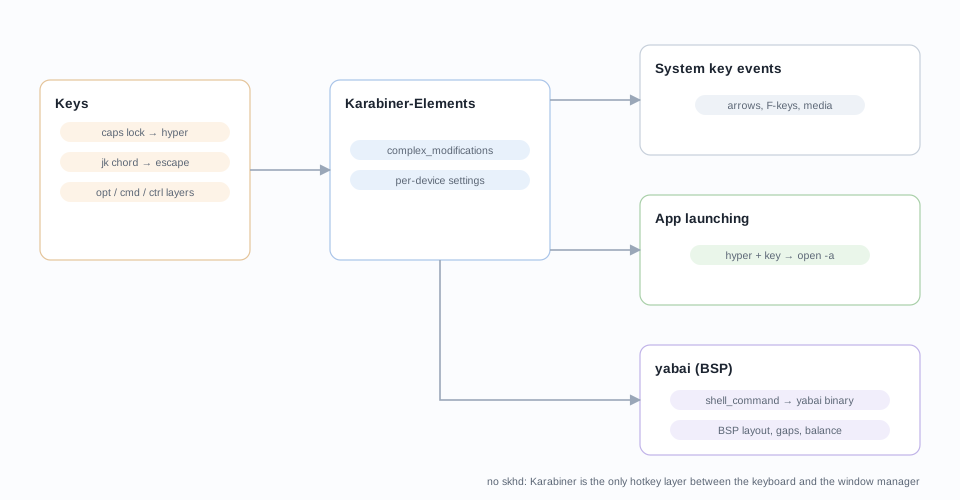
The complex_modifications layer
All the interesting behavior lives in
~/.config/karabiner/assets/complex_modifications/*.json: twelve
hand-edited files, each a self-contained rule bundle that the Karabiner GUI
imports. Edits here survive every GUI rewrite.
Per-device settings handle the smaller jobs alongside the rules. Two external
keyboards swap command and option, because both are Windows-layout
boards and muscle memory should not care which machine I am typing on. On
the laptop, the built-in keyboard disables itself whenever that external
board is connected. Four fn keys get back their macOS duties (mission control, launchpad, and the two illumination keys) for boards that ship
without a media row.
The hyper key
The anchor of the whole setup is caps lock. When pressed with any other key
it becomes hyper: command+control+option+shift all at once. That single
decision turns one dead key into a prefix with no competition, since no
macOS app binds all four modifiers.
The rule comes from the Karabiner complex modifications
library ↗. Real caps
lock did not die; it moved: shift+caps_lock stays actual caps lock, which
I press roughly never, and
caps lock alone still holds caps lock, which the app launcher relies on for
chording.
The hyper layer launches apps straight from the keyboard:
| Key | Opens | Key | Opens |
|---|---|---|---|
| t | iTerm | c | Calendar |
| s | Safari | a | Activity Monitor |
| f | Firefox | d | Disk Utility |
| v | VS Code | i | Music |
| m | Spark | 1 2 3 | OneNote, Word, Excel |
One subtlety: hyper is exactly the chord macOS uses for its hidden system diagnostics, so a fumbled launcher key can pop a wifi diagnostic utility in the middle of a demo. Three rules defuse that by remapping the dangerous chords to harmless keys:
{ "from": { "key_code": "period",
            "modifiers": { "mandatory": ["command", "shift", "option", "control"] } },
"to": [ { "key_code": "f19" } ] }The comma and w variants map to F18 and F17 the same way. Function keys
themselves get help too: fn+1 through fn+12 emit F1 through F12 for the
boards that lack a function row, and F3 through F6 remap to mission
control, launchpad, and keyboard illumination.
Escape, quit, and punctuation
Three small rules earn their keep daily:
- jk escapes. Pressing
jandkwithin 200 ms of each other, in any order, emits Escape. The hands almost never leave the home row, in the editor or anywhere else. - Esc is the backtick key. Escape with any modifier passes through as
backtick with that modifier:
command+esccycles windows (command+backtick),command+shift+esccycles in reverse, and plainshift+esctypes a tilde. Escape sits in a better spot than the real backtick on most boards. - command-q needs a hold. The quit shortcut requires holding command-q briefly before the app quits. Between the command/option swap on external boards and how often I mangle chords, accidental quits were a weekly event; now they are impossible.
And one for the typists: semicolon and colon swap characters. Unshifted
semicolon types :, shifted types ;. Code likes colons far more than
prose likes semicolons, so the common character gets the home position.
Vi mode and mouse keys
Two presets from the same
library ↗ handle the
cases where a key cannot just emit another key: Karabiner variables. In the
Vi Mode rule, F+j pressed together latches vi mode, and until
it clears, hjkl move the cursor, with variants for word-wise option-arrows
and control+a/control+e. A companion chord latches visual mode, where
the same movements carry shift and extend a selection.
Mouse Keys Mode v4 is the same idea for the pointer, using d as the mode
key: d+hjkl moves the cursor, d+u/d+i/d+o click left, middle, and
right, d+s toggles scroll wheel mode, and d+g/d+a drop or raise the
speed to 0.4x and 2x. It rarely replaces the mouse, but for the occasional
trackpad-unreachable click while my hands are on the keyboard, it is
exactly right.
Karabiner as the yabai hotkey layer
Here is the whole trick in one manipulator: a complex modification rule whose output is a shell command.
{
  "type": "basic",
  "from": {
    "key_code": "h",
    "modifiers": { "mandatory": ["option"] }
  },
  "to": [
    { "shell_command": "/opt/homebrew/bin/yabai -m window --focus west" }
  ]
}Option-h focuses the window to the west. Sixteen rules of this shape,
grouped in one yabai-karabiner.json file, cover every window operation I
use:
| Keys | yabai command |
|---|---|
| opt + h j k l | focus west / south / north / east |
| opt + p / n | focus previous / next, stack-aware with fallbacks |
| opt + shift + p / n | focus within the stack |
| opt + shift + h j k l | swap with the window in that direction |
| cmd + shift + h j k l | warp the window in that direction |
| opt + shift + w a s d | grow the window |
| cmd + shift + w a s d | shrink the window |
| opt + ctrl + arrows | insert west / south / north / east |
| opt + ctrl + h j k l | stack in that direction |
| opt + r / x / y | rotate 90, mirror y-axis, mirror x-axis |
| opt + d / f | zoom-parent / zoom-fullscreen |
| opt + shift + f | native fullscreen |
| opt + cmd + 0 | balance the tree |
| opt + ctrl + space | toggle float |
| shift + ctrl + z / x / c | send window to previous / recent / next space |
| shift + ctrl + 1..0 | send window to space 1 through 10 |
The focus rules deserve a note. opt+n runs
yabai -m window --focus stack.next || yabai -m window --focus next || yabai -m window --focus first, so the same key walks a stack, then the
flat layout, then wraps around. Stacks stop being a special case.
On the yabai side, ~/.config/yabai/yabairc is deliberately boring: BSP
layout, a 6 px gap with generous top and bottom padding, window_border on
at 6 px so the active window is obvious, auto_balance on, and ctrl-drag
for move, resize, and stack-by-dropping. The bulk of the file is a long
manage=off list: menu-bar apps, dialogs, utilities, picture-in-picture
windows, anything that tiles badly stays floating, below everything else.
There are commented-out rules that used to pin apps to numbered spaces; the
space assignments now live entirely in my head and the shift+ctrl bindings.
Costs and gotchas
Every keypress in these rules spawns a shell. At human key rates that is
invisible, but it is worth knowing that each option-h is a process, not a
signal. The hand-edited rule files in assets/ are the safe layer to edit;
the GUI only records that it imported them. Nothing in this stack needs a
scripting engine: Hammerspoon and Übersicht from earlier setups are gone,
because Karabiner already covers both the key remapping and the command
dispatch.
One thing the move gave up: BetterTouchTool’s customization of the MacBook’s Touch Bar, the strip above the keyboard. I kept a quick compile button for Xcode there and used it plenty; Karabiner cannot touch that hardware, so the bar went back to Apple’s defaults.
Closing
The practical change is that my hands stay on the home row from login to shutdown. Window arrangement used to mean trackpad grabs and drag-to-snap; accidental quits were routine; now both are gone, and window management is a folder of plain JSON I can actually read. Moving over from BetterTouchTool took one long evening, and it has paid that back every workday since.