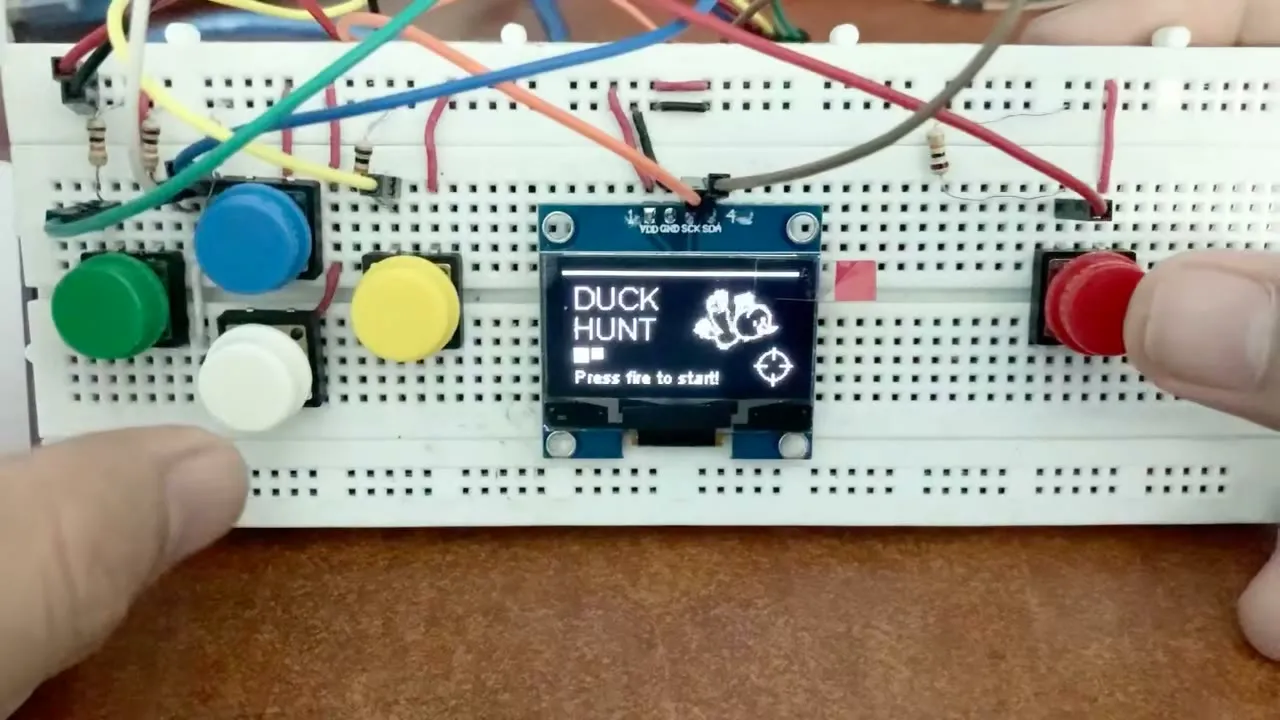
Duck Hunter on a Breadboard
A 60-second score attack on an Arduino Mega and a tiny OLED, five big arcade buttons, and honestly way too much jumper wire
Overview
This is a little Duck Hunt game running on an Arduino, an OLED screen, and five big arcade buttons. The original is Tiny Duck Hunt ↗ by Danko, who built it for a NodeMCU board, and it even got a write-up on Hackaday ↗. Danko shared the code in that thread, so I ported it to a Mega 2560, wired up my own circuit with buttons, and had something playable in an afternoon.
The whole thing is a 60-second score attack: birds fly across a small screen, you move a crosshair with four buttons, and you press the big red one to shoot.
One round in action. The score gets up around 150 before the clock runs out.
The circuit
Everything lives on one breadboard:
- A 0.96 inch OLED screen on I2C. It only needs four wires: power, ground, and the two data lines labeled SCK and SDA on the board.
- Four direction buttons on the left, in the same layout as a D-pad: up, down, left, right.
- One big red button on the right for shooting.
- Each button gets a pull-down resistor, so the pin reads low while nobody is touching it and jumps high when the button is pressed.
The wiring was honestly the slowest part. Five buttons’ worth of jumper wires, all crossing each other, makes the breadboard look messier than it is. But when the screen lit up with “DUCK HUNT, Press fire to start!” it all felt worth it.
The gameplay
Press fire, wait through the loading bar, and you get 60 seconds. Birds of different sizes fly across the screen, and each size is worth a different amount of points. The score and the clock sit at the top so you can see both fall apart in real time.
In the clip above I got to about 150, mostly by camping the crosshair in the middle and spamming fire. There is no dog in this version, which means nothing laughs at you when you miss. That alone makes it better than the NES original.
Porting it to Arduino
The original ran on a NodeMCU, an ESP8266 board with 3.3 V logic and dedicated I2C pins. I moved it to a Mega 2560, and the RAM on that board is the reason it is a Mega and not an Uno: the SSD1306 driver keeps a full 128x64 frame buffer in memory, which is 1 KB before the game stores anything, and the ATmega2560’s 8 KB of SRAM absorbs that along with the sprites and game state without sweating every byte.
Rendering on this class of hardware was the part I was least ready for. Embedded systems classes teach you to count bytes, but the contrast with the single-board computers I usually reach for made it stick: on a Raspberry Pi, drawing is a solved problem, with a GPU and a whole OS handing you a framebuffer you never think about. On a microcontroller, the frame buffer is a kilobyte of your SRAM.
The display library became Adafruit’s SSD1306 driver ↗ with its GFX ↗ graphics API, and the wiring followed the board. The NodeMCU has fixed I2C pins; on the Mega, SDA and SCL live on pins 20 and 21, so the whole bus moved. The OLED took some persuading after that: the sketch needed the right I2C address, which is 0x3C or 0x3D depending on the module, and the pull-ups on SDA and SCL needed sorting before the bus would talk.
With the screen up, the port became about holding the frame rate. The ESP8266 pushes frames from an 80 MHz core; the Mega runs at 16 MHz, a fifth of the speed, and the full-buffer redraw showed it. The bird sprites moved into flash with PROGMEM instead of living in RAM, and the redraw strategy changed so each loop only rewrites what it has to. The game logic carried over as is; once the screen showed something, the buttons were five digital reads, and the whole thing ran without any other changes worth writing home about.
The animation practice is heading somewhere, too. I want to build an automated water pump system for my uncle, and the tank level should show up on its small display as something friendly and uncluttered, not a debug console. A game loop that fights for frame rate on a 128x64 panel turns out to be good training for that: cheap redraws on a small screen.
Links
- Tiny Duck Hunt on r/arduino ↗, the original by Danko
- Tiny Duck Hunt Looks Like Big Fun ↗, the Hackaday write-up