Cloudflare DDNS and split-brain DNS with OPNsense and AdGuard Home
One name for every service, answered differently inside and outside, and working the same from the couch and a hotel Wi-Fi
Overview
Every service in this homelab has one public name, and that name has to work identically from the couch and from a hotel Wi-Fi. This post covers how the names resolve: AdGuard Home as the LAN resolver for ad blocking and caching, OPNsense as the recursive upstream with DDNS updates into Cloudflare, and a split-brain setup where the same endpoint answers with a different IP depending on which side of the firewall the query comes from.
The physical host and guest layout live in the homelab write-up; this is the DNS layer on top.
A disclaimer before the details: every hop below has an alternative that is simpler, more modern, or somebody’s favourite. What follows is the shape that survived my ISP changes and my own tinkering.
The resolver chain
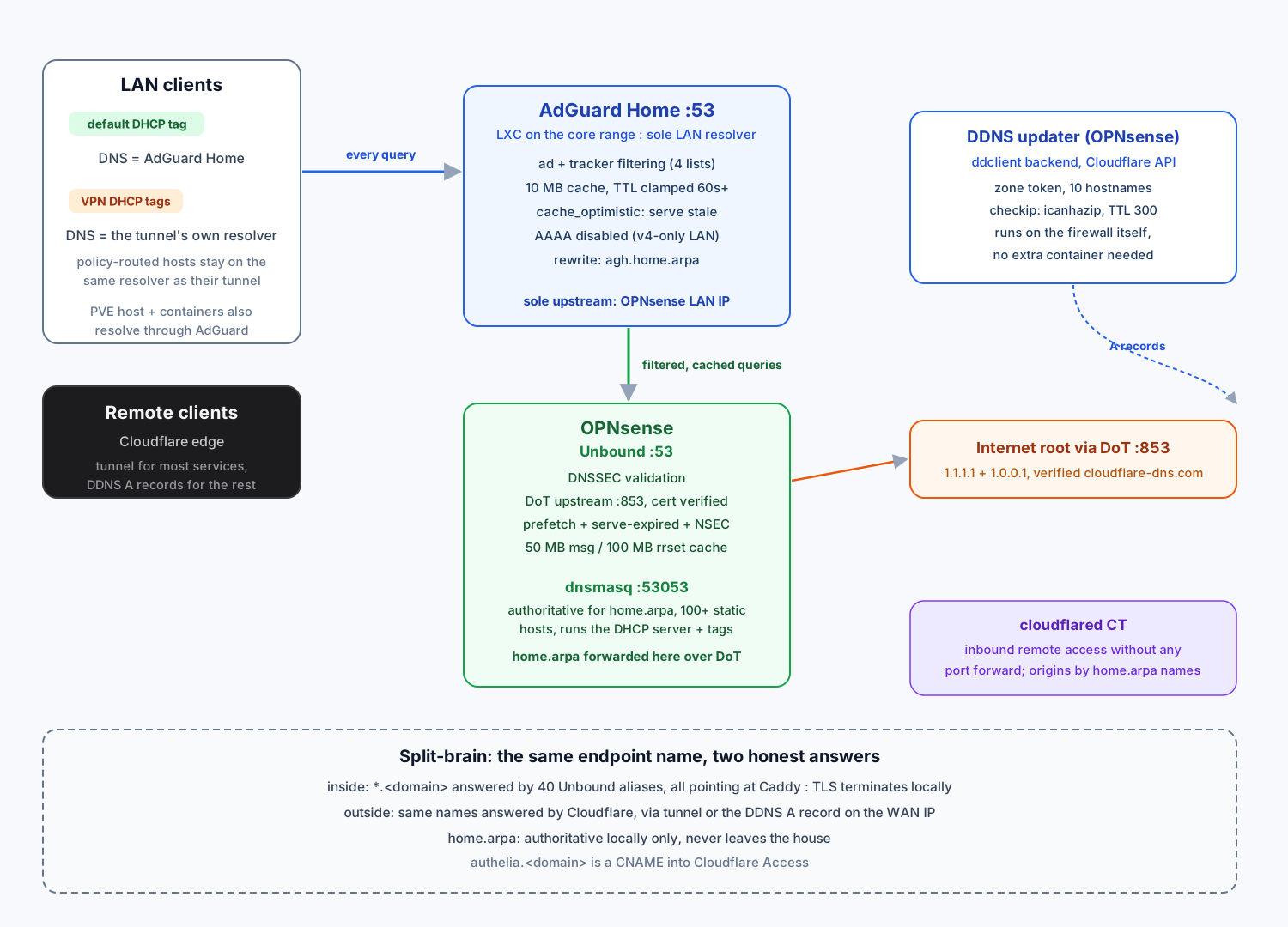
Three resolvers, one job each:
LAN clients
  -> AdGuard Home       :53     filtering, caching, the only resolver clients see
  -> Unbound (OPNsense) :53     DNSSEC, recursion, DoT upstream
-> dnsmasq (OPNsense) :53053 authoritative for home.arpa, DHCP leasesAdGuard Home runs in an LXC on the core range, and its sole upstream is the OPNsense LAN IP. That ordering is deliberate: filtering cannot be bypassed by pointing a client at a well-known public resolver, because there is no direct path allowed through the firewall for DNS. The Proxmox host itself also resolves through AdGuard (search home.arpa, nameserver pointing at AdGuard), so containers and the host get the same filtered answers. Is one strict chain over-engineered for a household? Probably. But DNS is also the first thing to break when everything else looks fine, and walking one known chain beats debugging whatever the router happens to ship with.
AdGuard Home: filter and cache
The blocking side is four filter lists, query log kept local. The interesting parts are the cache settings, which turned the resolver into a noticeable speed-up for repeated lookups:
| Setting | Value | Effect |
|---|---|---|
cache_size | 10 MB | plenty for a household |
cache_ttl_min | 60 s | short-lived records stop hammering upstream |
cache_ttl_max | 86400 s | long records stay cached for a day |
cache_optimistic | true | expired entries are served stale, then refreshed in the background |
aaaa_disabled | true | the LAN is IPv4-only, so AAAA queries get instant empty answers |
cache_optimistic matters most when the upstream is slow or down: clients keep getting last-known answers instead of timeouts. None of these numbers are gospel; I tuned them against the query log until repeat lookups felt instant, and a bigger household would outgrow them.
Bootstrap resolution happens over encrypted DNS (9.9.9.10) so the resolver does not bootstrap itself in plaintext. One rewrite maps agh.home.arpa to the AdGuard container itself, so its admin UI has a stable local name.
DDNS with Cloudflare
The ISP cycles the WAN IP, and a handful of services need a direct path that bypasses the Cloudflare Tunnel, raw throughput being the main one. The DDNS updater is not a container: it is the DynDNS plugin on OPNsense itself, using the ddclient backend in Cloudflare token mode.
service:   Cloudflare API, zone-scoped token
zone:      the public domain
hostnames: 10 A records, including the firewall's own pve-ddns name
checkip:   web (icanhazip), 10 s timeout
ttl: 300Running it on the firewall means no extra container, and the check source (icanhazip) always sees the WAN IP from the box that owns the WAN interface. TTL is kept at 300 s so a failover or ISP change propagates fast. A dedicated updater container would do the same job; I preferred one less thing to restart, and the plugin has been correct across every address change so far. One cron job also renews the WireGuard resolvers nightly to clear stale DNS state on the tunnels.
Split-brain: one name, two answers
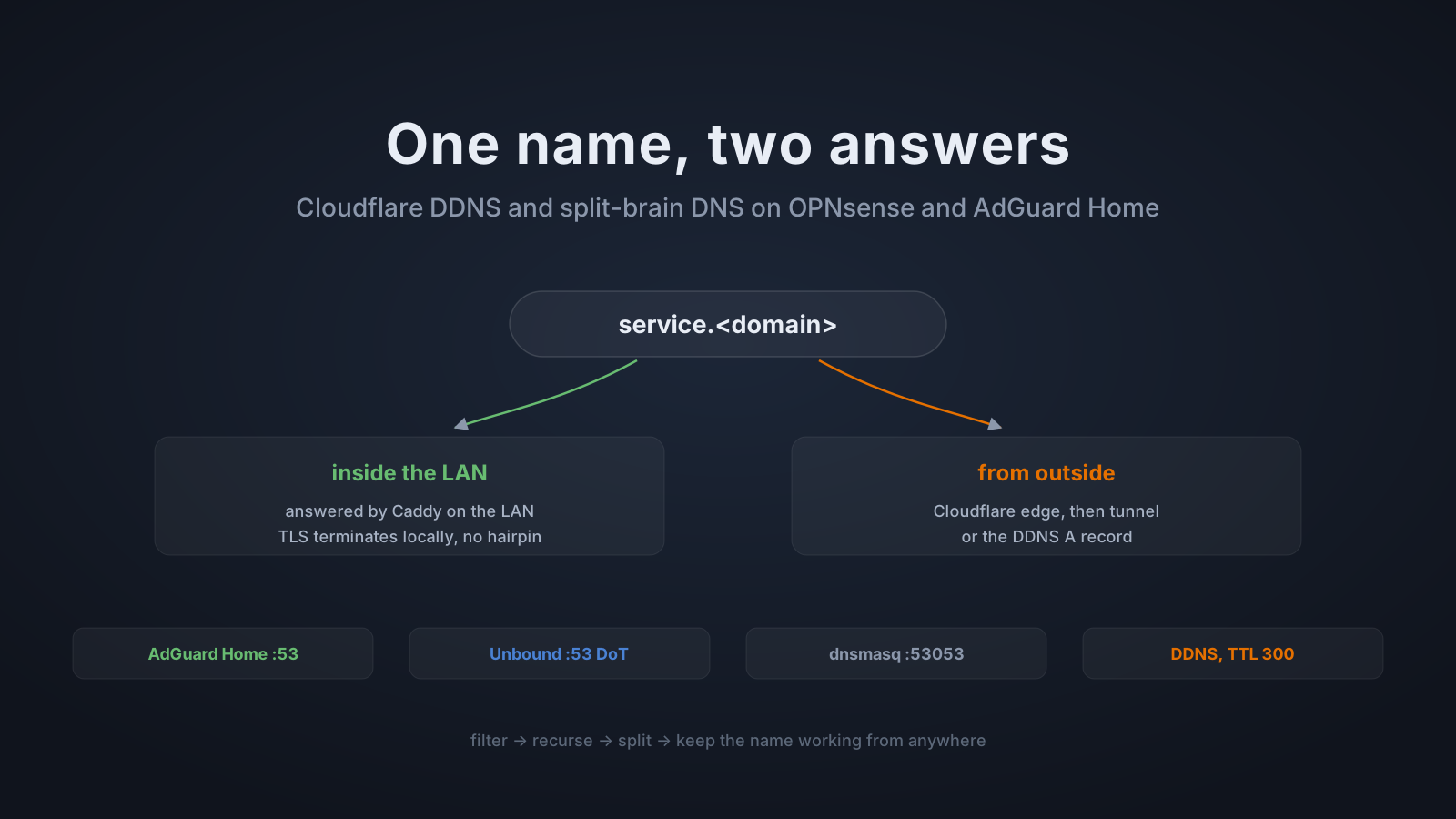
This is the part that makes bookmarks portable. Every service has one name that works anywhere, but the answer depends on where the query comes from:
inside:   jellyfin.<domain>  ->  Caddy, TLS terminates locally
outside: jellyfin.<domain> -> Cloudflare edge -> tunnel or DDNS A recordInternally this is done with Unbound host overrides. A single host record points caddy.home.arpa at the reverse proxy, and 40 aliases bind the public subdomains (pve, jellyfin, files, hass, scrypted, and the rest) onto that same record. So a LAN client asking for a public name gets the reverse proxy directly, on the LAN, without hairpinning through the ISP path, and Caddy still serves the certificate for the exact name requested.
Externally the same names live as Cloudflare records. Most are served through the cloudflared tunnel (no open ports at all), while the ten DDNS hostnames are plain A records on the WAN IP for the services that need raw throughput. Authentication for internal users goes through authelia.<domain>, a CNAME into Cloudflare Access, so the same SSO flow protects both the tunneled and the direct paths.
The internal-only zone stays fully authoritative on dnsmasq at port 53053, with a hundred-plus static host entries (one per service and device, each with a description). Unbound forwards home.arpa queries to it over DoT on loopback, so even internal resolution is encrypted hop-by-hop, and the private-domain option stops rebinding protection from eating the answers.
Other DNS tricks on the box
A few smaller setups worth noting, all verifiable in the configs:
- Per-client DNS via DHCP tags. The dnsmasq DHCP server groups options into tags: the default range hands out AdGuard, while hosts that route through a VPN tunnel get that tunnel provider’s own resolver instead. A policy-routed host resolving through the wrong resolver is a leak; the tag system closes it at assignment time.
- The firewall knows its own IP. A
WAN_IPalias is a URL table pointing athttps://127.0.0.1/dynamic_ip.txt, a tiny endpoint the firewall serves itself with the current WAN address, refreshed every six minutes. Firewall rules can then reference “my own WAN IP” symbolically instead of a literal address that changes. - Recursive hardening on Unbound. Aggressive NSEC, prefetch, serve-expired with TTL reset,
hide-identity/hide-version, and 50 MB/100 MB message and RRSet caches with a 24 h max TTL. Standard list, but each one measurably cuts upstream load. - Everything resolves through AdGuard. Host, containers, VMs, the
search home.arpadomain. One query log shows every name the household looked up, which is half of debugging.
Closing
The chain looks long on paper, but each hop exists to remove a failure mode: AdGuard so ads die before they load, Unbound so upstream queries are encrypted and validated, dnsmasq so internal names never leave the house, the split-brain aliases so one name works from anywhere, and DDNS so the direct path survives an IP change. Total moving parts a reboot can break: two resolvers and one updater, all running on machines that boot in under a minute and start in the right order. Would I build it this way again? Mostly, yes. There are fewer hops in some guide out there, but each of these has already paid for itself in something that stopped breaking.